100% FREE SOFTWARE

AvatarYour search for high quality software? but you are confused because have to pay! If you answer "YES" then this website is right for you.

Showing posts with label Software. Show all posts

Video Downloader - Google Chrome Extension

For Google Chrome users are difficulties in downloading videos from popular sites like YouTube, GoogleVideo, Metacafe, imeem, myspace, dailymotion and more, can use an Extension Video Downloader which can be integrated with the Google Chrome Browser.

With this Extension to the download link and then be automatically downloaded very easily and quickly. So you do not need to use another program to download videos from sites like youtube.com

After installing this extension will display icon next to the portion of the address bar. Click on the icon that will display a dialog box that asks you to give the URL of the video you want to download. Next you will get the download link option is usually available in several video formats, select the one it will be downloaded automatically

This extension is still under development, so expect a lot of improvements from the developer. To obtain this extension could be at this address: chromeextensions.org
continue reading...

Mozilla FireFox 3.6 Final

Mozilla Firefox 3.6 - Faster, more secure, easier to use and sporting a new look, this latest Firefox release sets a new standard for web browser innovation. Mozilla Firefox project is a redesign of Mozilla's browser component, written using the XUL user interface language and designed to be cross-platform. It is small, fast and easy to use, and offers many advantages over other web browsers, such as the tabbed browsing and the ability to block pop-up windows

Update available in Firefox 3.6 have on the security side, the stability of the browser and several other small bugs. Firefox 3.6 Final supported Operating Systems Windows, Mac OS X and Linux. For those who want to try and try out this latest version can be downloaded on the download link below:

Firefox 3.6 Notable features include:

* Available in more than 70 languages - get your local version.
* Support for a new type of theme called Personas, which allow users to change Firefox's appearance with a single click.
* Protection from out-of-date plugins to keep users safer as they browse.
* Open, native video can now be displayed full-screen and supports the poster frames.
* Improved JavaScript performance, overall responsiveness browser, and startup time.
* The ability for web developers to indicate that scripts should run asynchronously to speed up page load times.
* Continued support for downloadable web fonts WOFF using the new font format.
* Support for new CSS attributes such as gradients, background sizing, and pointer events.
* Support for new HTML5 DOM and specifications including the Drag & Drop API and the File API, which allow for more interactive web pages.
* Changes to how third-party software can integrate with Firefox in order to prevent crashes.


continue reading...

CCleaner 2.27.1070 Final


Program Summary:

CCleaner is a freeware PC optimization tool.
It combines a system cleaner that removes unused and temporary files from your system and also a fully featured registry cleaner!
CCleaner allows Windows to run faster, more efficiently and gives you more hard disk space.
The best part is that it's Small, Fast and Free!

Cleans the following Windows components:

  • Internet Explorer
    - Temporary File Cache
    - URL History
    - Cookies
    - Hidden Index.dat files
    - Last download file location
  • Firefox
    - Temporary File Cache
    - URL History
    - Cookies
    - Download manager
  • Google Chrome
  • Opera
  • Safari
  • Recycle Bin
  • Clipboard
  • Windows Temporary files
  • Windows Log files
  • Recent Documents (on the Start Menu)
  • Run history (on the Start Menu)
  • Windows XP Search Assistant history
  • Windows XP old Prefetch data
  • Windows memory dumps after crashes
  • Chkdsk file fragments

Advanced Options allow cleaning of:

  • Menu Order cache
  • Tray Notifications Cache
  • Window Size and Location Cache
  • User Assist history
  • IIS Log Files
  • Custom Folders

Application Cleaning:

As well as cleaning up old files and settings left by standard Windows components, CCleaner also cleans temporary files and recent file lists for many applications. Including:
  • Firefox, Opera, Safari, Media Player, eMule, Kazaa, Google Toolbar, Netscape, Microsoft Office, Nero, Adobe Acrobat Reader, WinRAR, WinAce, WinZip and more...

Registry Cleaning:

CCleaner uses an advanced Registry Cleaner to check for problems and inconsistencies. It can check the following:
  • File Extensions
  • ActiveX Controls
  • ClassIDs
  • ProgIDs
  • Uninstallers
  • Shared DLLs
  • Fonts
  • Help File references
  • Application Paths
  • Icons
  • Invalid Shortcuts and more...

Safety:

CCleaner was designed from the ground to be safe and secure to use. It has multiple levels of checks in place to ensure that it cannot delete any useful information or documents you may still need. We also certify that it contains no Spyware or Adware.

High Security:

For the super cautious users we also offer secure file erasing. By overwriting the files before deleting them, making it impossible to recover the data.

Multiple Languages:

Thanks to the translators, CCleaner is available in 35 different languages:

English, Albanian, Arabic, Bosnian, Bulgarian, Catalan, Chinese (Simplified), Chinese (Traditional), Czech/Slovak, Danish, Dutch, Finnish, French, Galician, German, Greek, Hebrew, Hungarian, Italian, Japanese, Korean, Lithuanian, Macedonian, Norwegian, Polish, Portuguese, Portuguese (Brazilian), Romanian, Russian, Serbian Cyrillic, Serbian Latin, Slovak, Spanish, Swedish and Turkish.

continue reading...

Mozzilla Firefox 3.5.7 Final

Mozilla Firefox 3.5.7 is the latest output of the Mozilla has fixed flaws in Mozilla Firefox 3.5.6

Firefox 3.5.7 fixes the following issues:
  • Fixed a common stability issue.
  • Fixed a problem with how updates were being presented to users.
Please see the complete list of changes in this version. You may also be interested in the Firefox 3.5.6 release notes for a list of changes in the previous version.

Download: Mozilla Firefox 3.5.7 Final

Download: Firefox All Release
continue reading...

Logon Changer for Windows 7


To you who get bored with the view of the innate Logon Screen Windows 7, you can use a simple tool Logon Changer for Windows 7. This program provides an easy way to change the logon screen display just a few clicks away

To use Logon Changer for Windows 7 is very easy, this application will ask for the location of the image you want to make a further background and will automatically change the logon screen display. You can also immediately see the results by clicking on the menu Test

Microsoft provides an image file size limit of 245 KB which can be used as display logon screen. But with this application you do not have to worry about that limitation, because the application automatically resize and recompress the image with good quality. And the original image untouched.

If you want to return the display to the default Logon Screen, click on "Revert to Default Logon Screen" and the application will automatically restore it as like the original. This application can also be run without having to install

continue reading...

Carbide.ui 3.4 Final


Latest News
Carbide.ui is now a family of tools for creating themes for Symbian and Series 40 devices.

Carbide.ui Theme Edition 2.0 has been released through the Symbian Foundation. This new version, which supports theme development for Symbian OS, S60 5.0, prepares Carbide.ui to support future Symbian releases.

Carbide.ui Series 40 Theme Edition 3.5 provides enhanced editing support for Series 40 device themes.

Note: Developers wishing to create themes for Symbian OS, S60 2.0 or audio themes for Nokia S60 on Symbian OS can do so by using Carbide.ui 3.4 Theme Edition.

Description
The Carbide.ui family of tools enables the creation of themes for Symbian and Series 40 devices. Carbide.ui provides access to the more than 1,000 customizable theme elements in the Symbian UI, which makes the Symbian UI the most customizable UI available. Carbide.ui is designed for professionals and hobbyists alike.

continue reading...

IE Tweaker - Internet Explorer Tweaker


Microsoft Internet Explorer 8 is one of the web browser is very good except for Firefox, Chrome and Opera. If you like surfing / browsing using Internet Explorer 8 you can use IE Tweaker program to tweak in IE 8. So that Internet Explorer will be more comfortable we use to taste what we want.

IE Tweaker is a program to configure and tweak Internet Explorer. IE Tweaker is an interesting freeware that will help to improve various problems in Internet Explorer. A number of configuration and repair can easily do without having to enter manually into the registry.

IE Tweaker Features:

* Browsing Options: Options to turn of various features like smooth scrolling, clear type, animations, automatic image Resizing or Musical.
* Clean the Junk Files: Delete files that are automatically stored by Internet Explorer including temporary Internet files, cookies, auto complete data or passwords.
* Tweak IE: Divided into tabs that tweak your Internet Explorer's toolbars, menus and advanced browser settings. Tweaks range from disabling the tab grouping and enforcing full-screen mode to turning off Accelerators, restricting proxy changes and hiding toolbars or control panel options in the web browser.

* Restrictions: restrict or disable various options in Internet Explorer like the Internet Connection Wizard, tabbed browsing, reset web settings or restricting users from enabling or disabling add-ons.
* Security: Configure security settings like filtering or InPrivate InPrivate browsing, phishing filters or managing smartscreen filters.
* Repair: Comes with several options of Internet Explorer repair including re-registering DLLs and oxcs files, fixing the Internet Explorer problem run once or switching from a multi-process single process tabs to tabs.


Download: IE Tweaker
continue reading...

Your Uninstaller Pro 2010 - Version 7.0.2010.11


As we know the Windows OS is Uninstall Programs menu in Control Panel. But the feature by default (the default) which is owned by the windows is not very clean and perfect as a software meremove. And sometimes there are some software or programs that can not be deleted / remove through control panel.

Your Uninstaller PRO 2010 (PRO YU 2010) is a reliable Uninstaller software and good. This program can remove the software or program we've ever installed on our PCs are complete and really clean. For works of this software system is also very fast.

Your Uninstaller 2010 when remove the program, complete with registry and delete the data associated with the database software. So when we delete / remove a piece of software will really clean without leaving garbage files that could cause our computer system becomes slow

Your Uninstaller is now present with their latest versions: Your Uninstaller 2010. In this latest version has added new features are amazing. Your Uninstaller 2010 also comes with an attractive new look and make its users more easily to operate this program

These softwares from the official website if you are rewarded with $ 39.99. But here we can use it with a FREE without having to go out to buy these softwares

Overview:

Your Uninstaller! is a complete solution for uninstallation tasks. Monitor, analysis, cleanup and rebuild. Makes your PC clean and stable. Scripts with advanced uninstall, Your Uninstaller! uninstall can solve most problems.

As the industry's leading uninstaller program, world's the 1st Drag & Uninstall ™ uninstaller under the Windows platform, using Your Uninstaller! has never been this easy. Imagine! Just a drag-drop and the unwanted program will be completely removed - no trace any left!

What's New in version 2010:

* Windows 7 Support
* 64 Bit Platform Support
* Core Level Optimization
* Re-designed User Interface
* New Hunter Mode
* Quick Uninstall Mode
* Different Levels Scan
* More ...

Key features:

* Fix invalid uninstallations in one click.
* Full system scan after being uninstalled a program for complete removal.
* Force removal of a program.
* Keep the system stable and clean with various system tools.
* Easy to Use. No expert knowledge required.
* Windows XP, Windows Vista and Windows 7 Compatible.
* Safe and Trusted.

Install Instructions YU PRO 2010:

* Perform installation yusetup2010.exe file that you have downloaded on this site
* When finished, close the back software Your Uninstaller PRO 2008.
* Then open and run the 2010 Pro YU
* Go to menu> help> enter code
* Enter data previously regristasi we get (serials.txt file)
* Finish

Completely Uninstall:

Your Uninstaller! completely takes the place of Windows Add / Remove program, while offering you many more features. Your Uninstaller can list "hidden" programs that you can not view using the Windows Add / Remove programs. The standard Add / Remove program often can not uninstall applications completely-leaving broken unused registry keys and files on the hard disk. Big registries and large numbers of unnecessary files make system slow. Your Uninstaller! clears broken keys and files in seconds using SmartUninstall ™!

The software must also seemed possessed by any computer user. Especially the likes and hobbies with mutually exchange softwares. This program file size is also small. To download this software, select the download link that I have given below:

continue reading...

Injured Pixels 1.0


LCD monitor is now a first choice and users continue to increase. The reason is because the LCD monitor displays save power and image quality is excellent. but the lack of LCD monitor is defective pixels. Pixel is not illuminated display or not display the correct color.

If there is a dead pixel will usually be seen there is a small dot (white, black or colored dot) on your LCD screen. To find out you can use the Freeware Pixels injured. Pixel injured is an application that can be used to check an LCD monitor is perfect whether or not pixelnya

InjuredPixels can be used to test a new LCD monitor before purchasing. This is to ensure that you are not wrong to buy a new LCD Monitor or you can do a warranty if there is the warranty period. InjuredPixels can be run directly without having to install it on your computer

Download: InjuredPixels 1.0

continue reading...

Winamp 5.57 Pro - The Ultimate Media Player


Winamp Player as an application audi and video player now released version of Winamp tela 5:57. With this new version would have a better performance than previous versions.

Although now widely available applications other audio player, Winamp still widely used, one factor that Winamp has an interesting view and supported olehbanyak skins that you can download for free on the official website or from the Applications Winamp

Nullsoft Winamp is a fast, flexible, high-fidelity media player for Windows. Winamp supports playback of many audio (MP3, OGG, AAC, WAV, MOD, XM, S3M, IT, MIDI, etc) and video types (AVI, ASF, MPEG, NSV), custom Appearances called skins (supporting both classic Winamp 1 .x/2.x skins and Winamp 3 freeform skins), audio visualization and audio effect plug-ins (including two industry dominating visualization plug-ins), an advanced media library, Internet radio and TV support, CD ripping, and CD burning .

* The Full version plays MP3s, AAC, WMA, and more; Compatible with Winamp 2 Plug-ins; Full Support for classic and modern skins; Plays Videos; has a Powerful Media Library; Browse Internet Radio & TV Stations; Integrated Internet Music Videos & Songs; Bundled Visualizations; and Burn & Rip CDs.

* The LITE version plays MP3s, AAC, WMA, and more. It is compatible with Winamp 2 Plug-ins and has full support for classic skins.


Winamp Player Features:

* Plays Music and Video Files (aacPlus, MP3, AAC, WMA and more!)

* Compatible with Winamp 2 Plug-ins

* Full Support for Classic and Modern Skins

* Plays Videos (NSV, WMV, and more!)

* Powerful Media Library

* Browse SHOUTcast Radio & TV Stations

* Browse Winamp Music Videos & Songs

* Integrated AOL Video Content (News, Sports, Movies & more)

* AOL Radio Featuring XM

* SHOUTcast Wire (podcast directory)

* Predixis MusicMagic (dynamic playlisting)

* Bundled Visualizations

* Burn CDs (Limited to 2x - 48x in Pro!)

* Rips CDs (Limited to 8x aacPlus, AAC, WMA - Unlimited aacPlus, AAC, WMA and MP3 in Pro!)

* 50 free Mp3s from eMusic

* Includes Winner of the Internet

* Surround Music Project!

* Includes an MP3 of 'Mercy Me' by Alkaline Trio

* Rip / Encode music into aacPlus, AAC, WMA, or MP3!

* Burn CDs up to 48x!

Install Instructions:

* Download and extract

* Perform installation of file winamp557_pro_all.exe

* When finished doing the installation. Serial.txt file to use Winamp to Full Version

* When entering the serial, the Internet must be in a state of death

* Finished


continue reading...

Corel VideoStudio X2 + Key Activator

If movie making is your passion, VideoStudio Pro is the video-editing software for you! Easy yet powerful, it offers end-to-end HD support for creating professional-looking videos and slideshows. Make quick edits with handy Wizards that help you automatically capture footage, polish videos and create DVDs. For more video-editing power, use new creative tools, including picture-in-picture and montage effects. Then add sophisticated DVD menus with unique disc menu transitions. Once your project is complete, share your creation on DVD, Blu-ray and AVCHD discs, iPhone® and other mobile devices. Even upload directly to YouTube to let the whole world in on the fun.
  • Import photos and video from anywhere—camcorders, cameras or TV
  • Edit with the easy Movie Wizard, or with hands-on professional video-editing tools
  • Make movies pop by adding titles, music and special effects
  • Create standard, Blu-ray or AVCHD discs to share with family and friends 
 This end-to-end HD video-editing program includes:
  • VideoStudio Editor – powerful video editing & disc authoring in leading formats, including HDV™ and AVCHD™
  • Movie Wizard – helps create complete movies in a few clicks
  • DV-to-DVD Wizard – the fastest way to record directly from tape to disc
  • Corel® WinDVD® – the world's #1 DVD player software
  • Supplementary content – extensive library of templates, overlay clips, title animations, menus and effects that help personalize and enhance projects
  • Documentation – Help file and PDF User Guide
  • Bonus NewBlue® Film Effects – 5 filters with 81 presets that give videos the magic of an "old-film" appearance 

Easier & more intuitive editing

  • Create video/audio cross-fades by simply dragging clips over each other
  • Resize interface windows to suit your needs
  • Apply effects more easily and accurately with larger dialog boxes and controls.
  • Trim clips quickly directly in the library
Top video-editing software – VideoStudio Pro X2

More creative options

  • Draw, paint or write freehand on video with the unique new Painting Creator. For example, trace a family vacation on the map
  • Add transitions to overlay tracks for sophisticated picture-in-picture effects
  • Apply auto pan & zoom to photos individually or in groups
  • Add background shapes to titles to make them stand out more
  • Recreate the appealing look of true cinema and old film with NewBlue Film Effects

Complete video solution

  • Enhanced! Capture video and photos in HD or standard definition from camcorders, the internet, TV, digital cameras and mobile devices
  • Personalize video and slide shows with a full set of editing tools
  • Create DVDs with stunning animated Hollywood-style menus
  • Enhanced! Output movies to HD or standard formats - Blu-ray, AVCHD, DVD, mobile devices, or YouTube
Best video-editing software – VideoStudio Pro X2

Easy to use

  • Enhanced! Create vibrant videos with the flexible user interface, clearly defined icons and guided workflow
  • Enhanced! Produce professional-looking movies or photo slide shows with the Movie Wizard - ideal for quick projects or for users new to video editing. Select from attractive theme templates and let the Wizard bring your video and stills to life
  • Burn video straight to disc with the DV-to-DVD Wizard the fastest way from tape to DVD. Just hook up your camcorder and in two steps you have a finished DVD
Best video-editing software – VideoStudio Pro X2

Powerful tools

  • New! Create sophisticated picture-in-picture and montage effects with transitions on overlay tracks
  • New! Apply audio/video cross-fades quickly and accurately by simply Overlapping clips
  • Enhanced! Create animated titles and add color backgrounds in a variety of styles
  • Encode Dolby Digital® 5.1 Surround Sound audio tracks with one click, using standard stereo audio
  • Improve video with automatic color and tone correction
Best video-editing software – VideoStudio Pro X2

Creative control

  • New! Paint, draw, or write freehand on video with the new Painting Creator – for example, draw vacation routes on a map
  • Enhanced! Make photo slide shows come to life with Auto Pan & Zoom that automatically recognizes faces
  • Replace any color background with effective Chroma Key tools
  • Enhanced! Create sophisticated DVD menus with unique disc menu transitions
  • Enhanced! Jumpstart your creativity with 100s of effects filters and content like overlay frames, objects and Flash animations
  • New! Make your video look like old film with NewBlue® Film Effects filters


End-to-end HD support

  • Enhanced! Import video in leading HD formats, including HDV™, AVCHD and Blu-ray Disc®
  • Enhanced! Edit smoothly and efficiently with unique Smart Proxy
  • Enhanced! Encode fast with dual-core and quad-core CPUs, in the latest formats like H.264
  • Enhanced! Author Blu-ray and AVCHD discs with sophisticated menus
  • Watch DVDs and AVCHD movies with Corel® WinDVD®
  
Download Corel VideoStudio X2

Download Key Activator Corel VideoStudio X2

continue reading...

Ad Banner Remover Plus - Version 1.0.4.1 FINAL


Click image for larger version


Name: abmain.jpg

Views: 175

Size: 89.8 KB

ID: 474

Advert Options

Main Messenger Advert - Removable
Change Room Banner - Replaceable
Chat Room Advert - Removable
Webcam Adverts - Replaceable

Other Options

Enable / Disable Multiple Instances of Yahoo Messenger 10, 9, or 8
Disable "Automatically start Yahoo Messenger" - When Windows Starts
Enable/Disable Smiley Search - Yahoo Messenger 10 Only

MD5

5CBA3FDC9E83A3BA51ED7762B6F87FB7

Download

Download from Megaupload - Download

Download from Mediafire - Download

Download from Multiupload - Download

Versions File

Download from Megaupload - Download ( Updated 11/12/2009 )

Download from Mediafire - Download ( Updated 11/12/2009 )

Download from Multiupload - Download ( Updated 11/12/2009 )

If you download Ad Banner Remover Plus from one of the download
links above then you do not need download an updated Versions file.

-----------------------------------------------------------------------------------------------

Yahoo Messenger 10.0.0.1102 is supported.

I have made some small changes to the User Interface in some places of the
application. I have also added a Help tab which includes a Help Document.
continue reading...

K-Lite Codec Pack 5.5.1 FULL FINAL


The K-Lite Codec Pack has a couple of major advantages compared to other codec packs:
- It it always up-to-date with the latest versions of the codecs.
- It is very user-friendly and the installation is fully customizable, meaning that you can install only those components that you really want.
- It has been very well tested, so that the package doesn't contain any conflicting codecs.
- It is a very complete package, containing everything you need to play your movies.

There are three versions of the K-Lite Codec Pack: Basic, Standard and Full.
K-Lite Codec Pack Basic contains only the most essential things. It contains everything you need to be able to play the most popular and widespread formats. It is small enough to fit on a single floppy. Also great for including on your movie CDs.
K-Lite Codec Pack Standard contains everything you need to play all the commonly used formats. This package should be enough for the average user.
K-Lite Codec Pack Full contains even more codecs. It also has encoding support for the various formats. This package is for power users and people who do their own encodings.

Features of K-Lite Codec Pack 5.5.1 FULL version :

Player :
- Media Player Classic Homecinema [version 1.3.1405.0]
- Media Player Classic Homecinema [version 1.2.1008.0]
FFDShow :
- ffdshow [revision 3158]
- ffdshow VFW interface
- Extra plugins: KernelDeint and TomsMoComp deinterlacers, DScaler plugin
- extra plugins
DirectShow video filters :
- XviD [version 1.2.2]
- DivX H.264 [version 8.2.0.26]
- On2 VP7 [version 7.0.10.0]
- MPEG-2 (Cyberlink) [version 8.4.0.923]
- MPEG-2 (Gabest) [version 1.0.0.4]
DirectShow audio decoding filters:
- AC3/DTS/LPCM/MP1/MP2 (AC3Filter) [version 1.63b]
- Vorbis (CoreVorbis) [version 1.1.0.79]
- AAC (MONOGRAM) [version 0.9.6.0]
DirectShow audio parsers:
- FLAC (madFLAC) [version 1.8]
- WavPack (CoreWavPack) [version 1.1.1]
- MusePack (MONOGRAM) [version 0.9.2.0 | 0.4.0.0]
- Monkey's Audio (DCoder) [version 1.0]
- OptimFROG (RadLight) [version 1.0.0.1]
- AMR (MONOGRAM) [version 1.0.1.0]
- DC-Bass Source [version 1.2.0]
- IT/MO3/MTM/S3M/UMX/XM (Tracker) and TTA (True Audio)
- AC3/DTS Source (AC3File) [version 0.7b]
DirectShow source filters:
- AVI splitter (Gabest) [version 1.3.1333.0]
- AVI splitter (Haali Media Splitter) [version 1.9.42.1]
- MP4/3GP/MOV splitter (Haali Media Splitter) [version 1.9.42.1]
- MP4/3GP/MOV splitter (Gabest) [version 1.3.1333.0]
- Matroska splitter (Haali Media Splitter) [version 1.9.42.1]
- Matroska splitter (Gabest) [version 1.3.1333.0]
- Ogg splitter (Haali Media Splitter) [version 1.9.42.1]
- Ogg splitter (Gabest) [version 1.3.1333.0]
- MPEG PS/TS splitter (Gabest) [version 1.3.1333.0]
- MPEG PS/TS splitter (Haali Media Splitter) [version 1.9.42.1]
- FLV splitter (Gabest) [version 1.3.1333.0]
- CDXA Reader (Gabest) [version 1.0.0.2]
DirectShow subtitle filter:
- DirectVobSub (a.k.a. VSFilter) [version 2.39.5.3]
- DirectVobSub (a.k.a. VSFilter) [version 2.33]
Other filters:
- Haali Video Renderer [version 1.9.42.1]
VFW video codecs:
- XviD [version 1.2.2]
- On2 VP7 [version 7.0.10.0]
- huffyuv [version 2.1.1 CCE Patch 0.2.5]
- YV12 (Helix) [version 1.2]
ACM audio codecs:
- MP3 (LAME) [version 3.98.2]
- AC3ACM [version 1.4]
Tools:
- Codec Tweak Tool [version 4.0.4]
- Win7DSFilterTweaker [version 2.2]
- MediaInfo Lite [version 0.7.25]
- VobSubStrip [version 0.11]
- GraphStudio [0.3.2.0]
- Haali Muxer
- Bitrate Calculator

Changes from K-Lite Codec Pack 5.5.0 FULL to K-Lite Codec Pack 5.5.1 FULL :

- Updated Media Player Classic Home Cinema to 1.3.1405.0
- Updated ffdshow to revision 3158
- Updated MediaInfo Lite to 0.7.25
- Updated Preferred filter tweaker for Windows 7 to 2.2
- The open linked files option in Haali Media Splitter is now enabled by default
- Minor changes and improvements

Features of K-Lite Codec Pack 5.5.1 STANDARD version :

Player :
- Media Player Classic Homecinema [version 1.3.1405.0]
- Media Player Classic Homecinema [version 1.2.1008.0]
FFDShow :
- FFDShow [rev. 3158]
DirectShow video decoding filters :
- MPEG-2 (Cyberlink) [version 8.4.0.923]
DirectShow audio parsers :
- FLAC (madFLAC) [version 1.8]
- WavPack (CoreWavPack) [version 1.1.1]
DirectShow source filters :
- AVI splitter (Haali Media Splitter) [version 1.9.42.1]
- MP4/3GP/MOV splitter (Haali Media Splitter) [version 1.9.42.1]
- MP4/3GP/MOV splitter (Gabest) [version 1.3.1331.0]
- Matroska splitter (Haali Media Splitter) [version 1.9.42.1]
- Ogg splitter (Haali Media Splitter) [version 1.9.42.1]
- FLV splitter (Gabest) [version 1.3.1331.0]
- MPEG PS/TS splitter (Gabest) [version 1.3.1331.0]
- MPEG PS/TS splitter (Haali Media Splitter) [version 1.9.42.1]
DirectShow subtitle filter :
- DirectVobSub (a.k.a. VSFilter) [version 2.39.5.3]
Other filters :
- Haali Video Renderer [version 1.9.42.1]
Tools :
- Codec Tweak Tool [version 4.0.4]
- Win7DSFilterTweaker [version 2.2]
- MediaInfo Lite [version 0.7.25]

Changes from K-Lite Codec Pack 5.5.0 STANDARD to K-Lite Codec Pack 5.5.1 :

- Updated Media Player Classic Home Cinema to 1.3.1405.0
- Updated ffdshow to revision 3158
- Updated MediaInfo Lite to 0.7.25
- Updated Preferred filter tweaker for Windows 7 to 2.2
- The open linked files option in Haali Media Splitter is now enabled by default
- Minor changes and improvements

Features of K-Lite Codec Pack 5.5.1 BASIC version :

- ffdshow [revision 3158]
DirectShow source filters:
- AVI splitter (Haali Media Splitter) [version 1.9.42.1]
- MP4 splitter (Haali Media Splitter) [version 1.9.42.1]
- MP4 splitter (Gabest) [version 1.3.1333.0]
- Matroska splitter (Haali Media Splitter) [version 1.9.42.1]
- Ogg splitter (Haali Media Splitter) [version 1.9.42.1]
- MPEG PS/TS splitter (Haali Media Splitter) [version 1.9.42.1]
- FLV splitter (Gabest) [version 1.3.1333.0]
DirectShow subtitle filter:
- DirectVobSub (a.k.a. VSFilter) [version 2.39.5.3]
Other filters:
- Haali Video Renderer [version 1.9.42.1]
Tools:
- Codec Tweak Tool [version 4.0.4]

Changes from K-Lite Codec Pack 5.5.0 BASIC to K-Lite Codec Pack 5.5.1 :

- Updated ffdshow to revision 3158
- Updated Preferred filter tweaker for Windows 7 to 2.2
- Minor changes and improvements

Important Note :

- The K-Lite Codec Pack works only on Windows 2000/XP/2003/Vista/7.

continue reading...

Super MP3 Download 3.3.1.2 Final + Crack


Super MP3 Download is an application designed to help you find and to dowload more than 100 million MP3 files. You can first try to listen to MP3 you are looking to decide which one to download. Super MP3 Download also has a feature which will display Top 100 songs that are popular every week.

List of songs that are popular can also be displayed by category, from Pop, Rock, Blues, Classical, Rap & Hip-Hop, R & B Soul, Country & Folk, Electronic, Indie & Alertnative, Jazz, Religious, World Music, More & Other. In addition you can perform advanced searches using the artist name, song title, album and editions. You can even choose special editions such as MP3 piano, guitar, etc.

Here are some key features of “Super MP3 Download” :
Over 100 Million MP3 songs :

  • Super MP3 Download is free to use. You can search and download over 100 million MP3 from the largest download network fast
Bring You The Hottest Songs :

  • Super MP3 download always brings you the hottest songs in the world. We recommend you the Billboard Hot 100 every week and list the hottest songs of every category, from electrical to religious, mainstream to indie, hip-hop to classical.
Unlimited Listen To Music Online :

  • You can unlimited listen to over 100 million songs online
  • You can try the searched results to decide which one to download.
Advanced Search :

  • Super MP3 download can search songs by title, artist, album, and edition. You can even search the live, piano, guitar or cover editions of your favorite songs
Install Instructions:

1. Extract Files SuperMp3Download-3.3.1.2.Setup.rar
2. Install SuperMp3Download-3.3.1.2.Setup.exe
3. Right-click on sortcut and click Find Target
4. Move files SuperMp3Download.exe to a folder C:\Program Files\SuperMp3Download
5. Done

With Super MP3 Download you can find and download MP3 files for free. With the Pro version that I gave then you can download many songs at once and can do advanced searches without limit.

Download : Super MP3 Download 3.3.1.2
continue reading...

VLC 1.0.3 - Video Lan 1.0.3


VLC media player is a highly portable multimedia player supporting most audio and video formats (H.264, Ogg, DivX, MKV, TS, MPEG-2, mp3, MPEG-4, aac, ...) from files, physical media (DVDs, VCD, Audio-CD), TV capture cards and many network streaming protocols.

It can also convert media files, transcode and act as a streaming server over unicast or multicast and IPv4 or IPv6. It doesn't need any external codec, program or codec pack to work.

VLC 1.0.3 Features:

* Free, Open Source and cross-platform
* Independent of systems codecs to support most video types
* Live recording
* Instant pausing and Frame-by-Frame support
* Finer speed controls
* New HD codecs (AES3, Dolby Digital Plus, TrueHD, Blu-Ray Linear PCM, Real Video 3.0 and 4.0, ...)
* New formats (Raw Dirac, M2TS, ...) and major improvements in many formats...
* New Dirac encoder and MP3 fixed-point encoder
* Video scaling in fullscreen
* RTSP Trickplay support
* Zipped file playback
* Customizable toolbars
* Easier encoding GUI in Qt interface
* Better integration in Gtk environments
* MTP devices on linux
* AirTunes streaming
* New skin for the skins2 interface

Download VLC 1.0.3
continue reading...

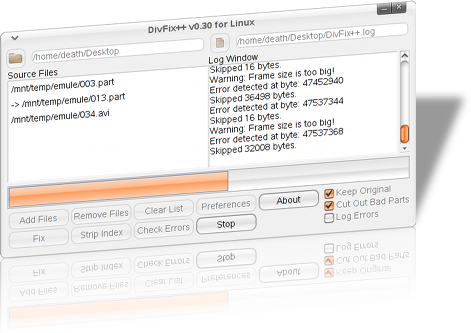
DivFix++ 0.34 For Windows


DivFix++ is started its life as CLI "DivFix" clone. I rewrite DivFix program due it's bugs and low performance.

This program repairs broken AVI file streams by rebuilding index part of file. This is very useful when trying to preview movies which has no index part, like some files are currently downloading from ed2k (eMule) or bittorent networks.
DivFix++ specialy designed for preview video download files from P2P networks.
    DivFix++ has supports CLI tools, this means you can fix a file to temporary location, preview with a player, than delete temporary movie file after preview automatically via script by using argument parameters...
    DivFix++ program code supports lots of operating system, because it's written by cross-platform API, wxWidgets.

How to use:


    GUI window has Drag'n'Drop support. You can drag and drop your AVI files to "Source/Input File List window" program instead of "Add File(s)" button...
    After file addition to the Source File List window, you needed to add your output path. for this files. After all press Rebuild Index and fix your avi. That's all.

Strip Index button is removes "index" part from file(s). Than file became "unsearchable" by most of avi players.

Check Errors button is scan files for any error and report it from log window.


CLI mode means starting DivFix++ with arguments. You can directly preview your file with "DivFix++ " basically.

Arguments list are here or by "DivFix++ --help" command.

-i, --input=
input file
-o, --output=
output file or directory
-p, --preview
delete output file after player is closed
-f, --fix_index_only
doesn't cuts out bad parts of file
-w, --overwrite
overwrite original file
-a, --all_frames
doesn't skip unwanted frames
-s, --skip_fix
skips fix process if index is available
-m, --media_player=
path of player
-h, --help
shows help


  • --input : Defines input file. You not needed to define --input if you want to preview.
  • --output : This option defines output file or directory. If you enter a file name than it creates/overwrites file. But if you enter a directory name to it, than output file name is becomes /DivFix++. automaticaly. If you don't enter output path, than output file will be created in input file path with DivFix++..
  • --preview : This option deletes output file after preview. DivFix++ runs backward and waits for player programs close signal. After that, it deletes output file. Than valuable disk space recovered to system. If you don't use this option.
  • --fix_index_only : This option keeps broken sections in avi file such as free sections. If input file is downloading from network since fix process, than it have free sections in it. This sections removed from output file as default action, but if you want, you can keep this sections in avi file.
  • --overwrite : This option makes output file is input file and overwrite input. If you needed to use this option, I suggest use with --dont_cut_out option together for overwrite only index part of file.
  • --all_frames : This option recovers extra frames from avi file. if there is broken section found in file, DivFix++ discarrds every frames (audio & data) until next KeyFrame. This makes lower corrupted video frame but you will loose audio in this frames too. If you want, using with --dont_skip_frames, you can recover this frames too. This option only available in CLI mode.
  • --skip_fix : This option skip fix process and execute player for preview if there is proper index available.
  • --media_player : This option takes name (if its in path) or path of media player executable which is executed for preview avi file.
  • --help : Himm, I forgot and cannot guess what it makes.
Notice for eMuLe/aMuLe users: Select DivFix++ executable file as your "preview application" from eMule.

You can only select file for preview but I make some special tokens for acceleration.
I am using CLI mode with this command line with my aMuLe ( don't confuse with eMuLe ) client. My configuration line is
/home/death/bin/DivFix++ -p -m gnome-mplayer -o /mnt/ramdisk/ -i

Let's parse this command.

/home/death/bin/DivFix++
this executes program.
"-p"
this for delete created file after closing player.
"-m gnome-mplayer"
this executes gnome-mplayer player after fix
"-o /mnt/ramdisk/ "
 this redirect output to RAM. I use this because reading and writing on same drive reduces speed.
"-i"
this is a input argument but you will notice there is no input over here. Why? Because aMuLe initiates command like "your command string" "file name". Than actual command at run time becomes:
"-i /mnt/Temp/emule-temp/001.part"

continue reading...

Internet Download Manager 5.18 Build 5 Final ( Hide Install )

Internet Download Manager (IDM) is a tool to increase download speeds by up to 5 times, resume and schedule downloads. Comprehensive error recovery and resume capability will restart broken or interrupted downloads due to lost connections, network problems, computer shutdowns, or unexpected power outages. Simple graphic user interface makes IDM user friendly and easy to use.Internet Download Manager has a smart download logic accelerator that features intelligent dynamic file segmentation and safe multipart downloading technology to accelerate your downloads. Unlike other download managers and accelerators Internet Download Manager segments downloaded files dynamically during download process and reuses available connections without additional connect and login stages to achieve best acceleration performance.
Internet Download Manager supports proxy servers, ftp and http protocols, firewalls, redirects, cookies, authorization, MP3 audio and MPEG video content processing. IDM integrates seamlessly into Microsoft Internet Explorer, Netscape, MSN Explorer, AOL, Opera, Mozilla, Mozilla Firefox, Mozilla Firebird, Avant Browser, MyIE2, and all other popular browsers to automatically handle your downloads. You can also drag and drop files, or use Internet Download Manager from command line. Internet Download Manager can dial your modem at the set time, download the files you want, then hang up or even shut down your computer when it's done.

Other features include multilingual support, zip preview, download categories, scheduler pro, sounds on different events, HTTPS support, queue processor, html help and tutorial, enhanced virus protection on download completion, progressive downloading with quotas (useful for connections that use some kind of fair access policy or FAP like Direcway, Direct PC, Hughes, etc.), built-in download accelerator, and many others.
Version 5.18 adds IDM download panel for web-players that can be used to download flash videos from sites like YouTube, MySpaceTV, and Google Videos. It also features complete Windows 7 and Vista support, YouTube grabber, redeveloped scheduler, and MMS protocol support. The new version also adds improved integration for IE and IE based browsers, redesigned and enhanced download engine, the unique advanced integration into all latest browsers, improved toolbar, and a wealth of other improvements and new features.

(Released: Nov 11, 2009)
  • Added Windows 7 support
  • Fixed critical bugs
Download IDM Version 5.18 Build 5 ( Hide Install)

    continue reading...

    CCleaner v2.26.1050 Final


    At Piriform, we're continuing to evaluate Windows 7 in the wild, and incorporate more Windows 7-specific features into CCleaner and our other products.

    CCleaner can now vacuum (or compact) SQLite databases for Firefox and Google Chrome, which can speed up those browsers. We've also added in cleaning for your computer's DNS cache.
    We've made many other improvements which are listed below:

    CCleaner v2.26.105 : 

    • Added support to clean Windows DNS cache.
    • Added vacuum SQLite databases for Firefox and Google Chrome.
    • Added publisher and version to Uninstall tool.
    • Added Taskbar jump list tasks for Windows 7.
    • Added Taskbar Progress for Windows 7.
    • Improved Exclude list registry keys addition functionality in 64bit Windows 7.
    • Improved Registry Cleaner detection algorithm and 64-bit file system redirection.
    • Improved "Save to text file" functionality in Cleaner screen.
    • Improved system tray icon activation and tooltip.
    • Improved Registry screen "fix selected issues" dialog usability by removing prompt.
    • Further improved RECURSE and REMOVESELF functionality.
    • Improved Uninstall screen detection algorithm.
    • Improved memory usage to avoid GDI leaks.
    • Fixed issue with Sticky Notes being detected as Missing startup item.
    • Fixed "Edit" and "Remove" button availability on Include/Exclude screen.
    • Fixed various GUI bugs.

      continue reading...

      Any Video Converter Free Version 3.0.1 Final

      Free Video Converter = MPEG Converter + AVI Converter + FLV Converter + YouTube Video Converter + MP4 Converter
      Any Video Converter Freeware- the Free Video Converter - is the most renowned free video converter for converting video files between various formats, with fast converting speed and excellent video quality. This powerful free video converter application makes video conversion quick and easy.

      This FREE video converter software can clip any segments and optionally merge and sort them to make a creative movie. And even more, Any Video Converter Freeware can crop frame size to remove any unwanted area in the frame just like a pair of smart scissors.

      Input formats:

      avi, asf, mov, rm, rmvb, flv, mkv, mpg, 3gp, m4v, vob, YouTube videos and more

      Output formats:

      avi, mp4, wmv, swf, flv, mkv, MPEG-1 and MPEG-2, mpg (PAL or NTSC), mp3, wma, ogg, aac, wave, m4a

      Free Video Converter features:

      • Universal video converter with easy and simple user interface supporting a wide range of video formats including AVI, FLV, MOV, MP4, MPG, M2TS, MTS, RM, RMVB, QT, WMV and more.
      • Provides popular out video formats including AVI, WMV, MPG, MP4, MKV, SWF, FLV and popular audio formats including MP3, M4A, OGG, WAVE, WMA.
      • Supports video trimming to convert any part you need of the original videos.
      • Supports video merging to merge video clips into a single file.
      • Includes a batch converter to quickly convert multiple movies and auto-shotdown functions for batch conversion.
      • Completely customizable video and audio parameters.
      • Download and convert online videos from YouTube, Google and NicoVideo in one step with YouTube video quality specifying support.
      • Supports up to 18 languages for people around the world.
      • Absolutely free - nothing to buy!

      Free Video Converter: Convert any Video formats Freely

      There is open source software to perform almost every task for video conversion. But if you are one of these windows users who are looking for an All-in-One video converting tool with easy-to-use graphical interface, Any Video Converter provides just that, allowing you to effortlessly convert video files for FREE!

      Any Video Converter Free Version can convert avi, asf, mov, rm, rmvb, flv, mkv, mpg, 3gp, m4v and vob to avi, wmv, mp4, mpg (PAL or NTSC), MPEG-1 and MPEG-2, swf, flv and mp3, aac, ogg, wave, m4a and wma.

      Any Video Converter makes batch file conversion simple. Create a batch list of any different formats and convert them all to a single selected format. The converted files will be saved to a pre-selected directory folder and the original files will remain untouched.

      It can convert almost all video formats including DivX, XviD, MOV, rm, rmvb, MPEG, VOB, DVD, WMV, AVI to MPEG-I, MPEG-I, DVD NTSC , DVD PAL, Flash for Video (FLV) ,AVI Video and Customized WMV movie formats. It also supports any user defined video file formats as the output. It has an unmatchable speed and high quality.

      Whether you are looking for free AVI video converter, free MKV video converter, free FLV video converter, free MP4 converter, or free YouTube converter, Any Video Converter Free Version is the right application for you. Download the free video converter now to convert videos and experience better digital life.

      Any Video Converter Free Version can also download and convert YouTube videos and Google videos.

      Reviews for Free Video Converter

      "Use this video converter software to convert video files into the formats you need to watch on TV, load to a cell phone, put on a website, watch on your portable device and much more. In fact, the possibilities are endless using this powerful video file converter. " -- By John K. Miller, CNET user

      "To have your favorite clips how you want them, whether that's on your DVR, iPod, PSP or desktop, you need the right utility to convert theem into the format that works for you. Commercial video converter software's aplenty, but there are several solid free utilities that can convert your video files on every operating system, or if you've just got a web browser and a quick clip. Put DVDs on your iPod, YouTube videos on DVD, or convert any video file with Any Video Converter Freeware, today's top 10 free video rippers, encoders and converters."
      -- From Lifehacker.com

      "Finally we get one free video converter. Free Video Converter is the popular freeware utility which has millions of satisfied users who enjoy power, speed, and simplicity of this versatile instrument - a rare combination in the world of modern video compression technologies. This Free Video Converter converts almost any video formats to any formats, while preserving the straightforward interface design which makes this program so easy and fun to use." -- By David Smith, Canada

      continue reading...

      Mozilla FireFox 3.5.6 Final

      Mozilla Firefox 3.5.6 - Faster, more secure, easier to use and sporting a new look, this latest Firefox release sets a new standard for web browser innovation. Mozilla Firefox project is a redesign of Mozilla's browser component, written using the XUL user interface language and designed to be cross-platform.

      Update available in Firefox 3.5.6 have on the security side, the stability of the browser and several other small bugs. Firefox 3.6 Final supported Operating Systems Windows, Mac OS X and Linux. For those who want to try and try out this latest version can be downloaded on the download link below:

      continue reading...